Excel Food Inventory List Template: Quantify, Organize, & Track Now
When it comes to managing a food business, maintaining a well-organized and accurate food inventory is crucial. This task is indispensable in ensuring smooth operations, minimizing waste, and maximizing profits. A food inventory list template on Excel is a practical tool developed to simplify this process.
This meticulously crafted tool enables businesses to categorize, manage, and track their food inventory in a seamless and efficient manner. It helps maintain stock levels, schedule restocking, and provides valuable insights for informed decision-making. However, with so many options available online, selecting the perfect food inventory list template can be overwhelming. This guide will delve into the intricacies of this useful Excel tool, its benefits, and how to create your own custom template.
What is a Food Inventory List Template in Excel?
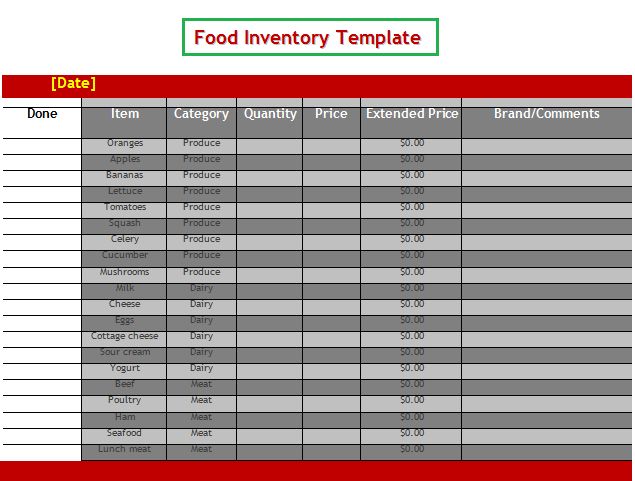
A food inventory list template in Excel is a pre-made, customizable spreadsheet that assists businesses in managing and organizing their food inventory. It typically includes various sheets where you can input information about your food items, their quantities, expiration dates, and other relevant details.


Excel templates offer a clean, structured layout that aids in quick and easy data entry. They are versatile, allowing businesses to tailor them to their specific needs, thereby streamlining inventory management and enhancing productivity.
Key Elements of a Food Inventory List Template
Every effective food inventory list template includes specific columns and sheets tailored to manage food inventory efficiently. Some essential elements include:


- Item Name: The name of the food product
- Item ID/Code: A unique identifier for each item
- Quantity on Hand: Current stock levels
- Reorder Point: The quantity at which more items should be ordered
- Unit of Measure: The standard unit used to track inventory (e.g., lbs, gallons, cases)
- Unit Price: The cost of each item per unit of measure
- Expiration Date: The date by which items should be consumed or discarded
- Supplier Information: Details about the item's supplier, such as contact information and lead time
Benefits of Using a Food Inventory List Template
Implementing a food inventory list template in your operations offers an array of advantages:
- Enhanced Organization: Templates help maintain a well-structured inventory list, making it easy to find and access relevant information
- Effortless Tracking: Regularly update yourtemplate to monitor stock levels, reorder points, and expiration dates
- Improved Decision-Making: Gain insights into your inventory performance, helping you make data-driven decisions
- Reduced Waste: Keep track of item expiration dates to minimize food spoilage and waste
- Time-Saving: Streamline your inventory management process, allowing you to focus on other aspects of your business
Creating a Custom Food Inventory List Template
If you're unsure about which pre-made template to choose, you can create your own with Excel. Here's a step-by-step guide to help you create a tailored template:
Setting Up Your Template
Follow these steps to set up your template's structure:


- Open a new Excel workbook
- Begin with a "Home" tab, where you'll include a summary of your total inventory and other key metrics
- Add separate sheets for different food categories (e.g., dairy, produce, frozen goods)
- Add columns for the key elements mentioned earlier
Customizing Your Template
Customize your template to best suit your needs by incorporating features such as:
- Conditional Formatting: Display changes in stock levels or dates with color-coding or other visual cues
- Data Validation: Set specific rules for input fields to ensure accurate and consistent data entry
- Reporting: Create summary reports or charts to track inventory trends and performance
- Automation: Use formulas and macros to automate data entry and calculations
By organizing and tracking your food inventory with an Excel template, you will enhance your operations, save time, and improve your bottom line. Periodically review and refine your template to ensure it continues to serve your business effectively. As your business evolves, consider integrating inventory management software or extensions to further automate and streamline your inventory management process.


Related Articles

Organize Your Kitchen: Free Excel Inventory List Template
Keeping track of your kitchen inventory is a crucial aspect of streamlining your cooking and mealtime preparation. While pen and paper lists can be useful...

Free Kitchen Inventory Template Excel - Track & Organize Supplies
In the bustling world of culinary arts, organization is key. A well-maintained kitchen inventory can save time, reduce waste, and ensure smooth operation. This...
Restaurant Inventory List Template Excel
Streamlining your restaurant operations with an efficient inventory management system is crucial for maintaining profitability and consistency in your culinary...

Dry Goods Inventory List: Organize & Track Effectively
Efficient inventory management is a bedrock of thriving businesses, especially those dealing with merchandise. A comprehensive understanding of your dry goods...

Restaurant Inventory Template Excel: Streamline Your Food Stock Management
Mastering restaurant inventory management is a critical aspect of ensuring profitability and efficiency in your culinary establishment. One powerful tool to...
Kitchen Inventory List Excel Template
Streamlining your kitchen's pantry and appliances is a breeze with the help of a well-organized kitchen inventory list . This comprehensive guide will walk you...