Food Inventory Spreadsheet Example
Managing a business's food inventory efficiently is no small feat, but it's a critical aspect that impacts your operations, profitability, and customer satisfaction. One excellent tool that can streamline this process is a food inventory spreadsheet. This article walks you through a practical example and highlights the benefits and best practices of using such a spreadsheet.
Before diving into the example, let's clarify what a food inventory spreadsheet is. It's a digital, organized record of all food items in your inventory, including their quantities, locations, expiration dates, and usage rates. This tool helps you track and manage your inventory in real-time, preventing stockouts, reducing waste, and ensuring food safety.
Key Components of a Food Inventory Spreadsheet
A comprehensive food inventory spreadsheet should include the following components to be effective:


- Item name/description
- Quantity on hand
- Reorder point
- Unit of measure
- Location (e.g., freezer, fridge, pantry)
- Supplier
- Quantity received
- Quantity used/dispensed
- Days on hand
- Expiration date


Item Name/Description
The item name or description should be detailed enough to distinguish between similar items, e.g., "Diced tomatoes (crushed)" vs. "Diced tomatoes ( Białą)".
Secondly, keep it concise to avoid overly lengthy records. For instance, you might list "Chicken breasts, boneless, Skinner" instead of "Boneless, skinless chicken breasts, fresh."
Quantity Tracking
Accurately tracking quantities allows you to monitor your inventory levels, set reorder points, and plan for future usage. Update these fields each time you receive, dispense, or adjust inventory.


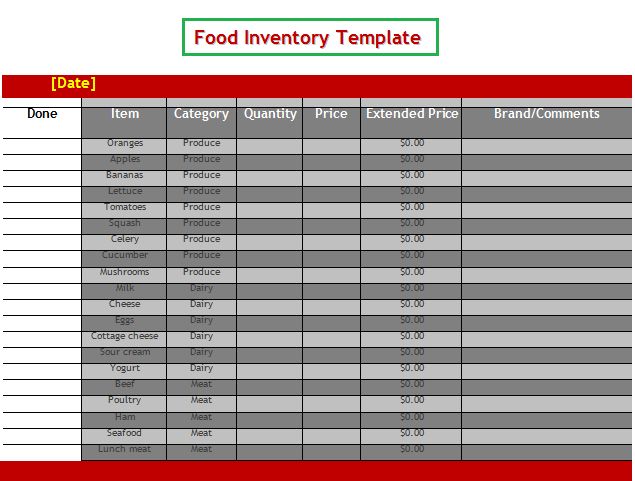


To prevent human error, consider using a system that automatically updates quantities based on usage. Some spreadsheets offer this functionality with simple formulas and macros.
Benefits of Using a Food Inventory Spreadsheet
Implementing a food inventory spreadsheet brings numerous benefits to your business:


- Real-time tracking: Monitor inventory levels in real-time, ensuring you always have what you need on hand.
- Reduce waste: Avoid overstocking and minimize spoilage by tracking expiration dates and usage rates.
- Improve cash flow: Save money by reducing stockouts and wasted inventory.
- Ensure food safety: Track and manage expiration dates to prevent serving or selling unsafe foods.
- Streamline ordering: Set reorder points to automate the purchasing process and avoid stockouts.
Real-time Inventory Management
By entering and updating data regularly, you can see up-to-the-minute inventory levels, helping you make informed decisions about reordering, usage, and waste.
For instance, you may realize that you've been using more salmon than expected, allowing you to adjust your orders and menu planning accordingly.
Automating Tasks with Formulas
Leverage spreadsheet formulas to automate calculations and save time. For example, use =TODAY() to automatically update the number of days an item has been in inventory.
You can also use IF statements to flag items nearing expiration or below the reorder point. For instance, "=IF(DaysOnHand<=3, 'Low', 'OK')".
Best Practices for Using a Food Inventory Spreadsheet
To maximize the benefits of your food inventory spreadsheet, follow these best practices:
- 只要可能,请经常性地更新您的库存数据。
- zwecks besseren Überblicks gliedern Sie Ihre Bestandslisten nach Kategorien, z. B. Obst, Gemüse, Fleisch und Meeresfrüchte.
- Regelmäßig überprüfen Sie und rationalisieren Sie Ihre Sortimentsbreite. Es empfiehlt sich,سيطرtaenliche und unerwartete Ausgaenge wegzulassen und stattdessen auf boesartige Artikel zu setzen.
- Verwenden Sie eine sortierbare und Suchfunktionen-fähige Tabelle, um Ihre Daten leicht zugänglich zu machen.
Regular Data Updates
Frequently updating your inventory data helps ensure accuracy and allows you to make timely decisions. Establish a routine for updating quantities, expiration dates, and other relevant information.
Consider designating specific times each day or week for updating your spreadsheet, such as during the morning shift change or at the end of the workday.
Categorization and Organization
Grouping items by category (e.g., produce, proteins, dry goods) makes it easier to find what you need and analyze usage patterns. You can also sort your spreadsheet by location, supplier, or other categories relevant to your business.
For example, sort produce items alphabetically for easy searching, or group proteins by prep time for efficient planning.
Food Inventory Spreadsheet Example
Now that we've explored the components, benefits, and best practices let's put it all together with a practical food inventory spreadsheet example.
Keep in mind that this example is tailored to a small restaurant. A large-scale operation or food manufacturer would require a more robust system, potentially including integrations with point-of-sale (POS) systems and enterprise resource planning (ERP) software.
Inventory Tracking Worksheet
Here's a simplified example of a food inventory tracking worksheet:
<%-- More rows as needed --%>
| Item Name | Quantity on Hand | Reorder Point | Unit of Measure | Location | Supplier | Quantity Received | Quantity Used/Dispensed | Days on Hand | Expiration Date |
|---|---|---|---|---|---|---|---|---|---|
| Chicken breasts, boneless, skinless | 15 | 10 | Each | Freezer | Farmer's Co-op | 12/15 | 0 | 7 | 12/22 |
Reorder Report Worksheet
To streamline the ordering process, create a separate worksheet for generating reorder reports:
<%-- More rows as needed --%>
| Item Name | Quantity on Hand | Reorder Point | Reorder Quantity |
|---|---|---|---|
| Chicken breasts, boneless, skinless | 15 | 10 | 6 |
With this setup, your ordering team can quickly identify which items need restocking and how much to order. Furthermore, the example's simplicity makes it easy to modify and extend for your specific business needs.
Properly managing your food inventory is a crucial step toward improving efficiency, reducing waste, and maximizing profitability. By implementing a well-structured food inventory spreadsheet and following best practices, you'll be well on your way to achieving these goals. As your business grows and changes, remember to periodically review and update your inventory management system to ensure it continues to support your operation's needs.
Related Articles
Food Inventory List Example
Ever found yourself rummaging through your pantry, only to realize you're missing a crucial ingredient for tonight's dinner? A food inventory list is your...
Food Inventory Sheet Template: FREE Excel Example
Welcome to our comprehensive guide on food inventory sheets. Maintaining an accurate food inventory is a critical component of running a successful restaurant...

Effortless Food Inventory Tracking: Sample Spreadsheet
Tracking the inventory of a bustling restaurant or cafeteria can be an uphill task, especially when done manually. This is where a sample food inventory...
Kitchen Food Inventory: Manage With Ease
Keeping track of food items in your kitchen can be a daunting task, especially in a busy household. A Kitchen Food Inventory Spreadsheet can make this process...
Restaurant Inventory Spreadsheet Example: Track Stock with Ease
Meticulously tracking and managing restaurant inventory is paramount for smooth operations and maximizing profits. A well-structured restaurant inventory...

Food Pantry Inventory Spreadsheet
The efficient management of a food pantry relies heavily on precise inventory tracking. This is where a food pantry inventory spreadsheet becomes an...