Food Inventory Excel Spreadsheet
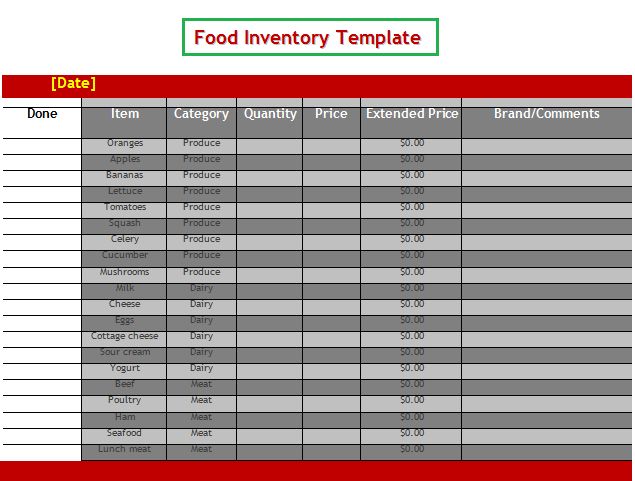
Efficiently managing your restaurant or café's food inventory is pivotal for maintaining fresh products, reducing waste, and ensuring your kitchen is always stocked. An Excel spreadsheet can be your secret weapon for streamlining this process, and we're here to guide you on creating and optimizing your food inventory Excel spreadsheet.
By following this comprehensive guide, you'll not only save time and effort but also make informed decisions that directly impact your bottom line. Let's dive in and transform your inventory management today!
Setting Up Your Food Inventory Excel Spreadsheet
To get started, open a new or existing Excel workbook and follow these initial steps to set up your inventory tracking foundation.


First, name your workbook "FoodInventory" for easy reference. Then, name your primary sheet "Inventory" to house all essential information. To create a second sheet for tracking and analyzing trends, name it "InventoryTrends".
Defining Your Inventory Columns
On the "Inventory" sheet, create a header row with the following column names:


- Item
- Description
- Category
- Unit of Measure
- Price per Unit
- Quantity in Stock
- Reorder Point
- Last Ordered
- Vendor
Formatting and Resizing Columns
Now, format your columns for optimal readability:
- Freeze the top row for easy navigation.
- Adjust column widths to display all text comfortably.
- Apply filters to easily sort and filter data.
Populating Your Food Inventory Excel Spreadsheet
With your spreadsheet structure in place, it's time to populate it with your current inventory. Here's how to input and organize your data effectively.
Entering Your Initial Inventory
Begin listing all food items, their relevant information, and the quantities you currently have in stock. To keep your inventory organized, sort items alphabetically by name.


Categorizing Your Inventory
For better navigation and analysis, categorize your items. Popular categories include:
- Produce
- Dairy & Eggs
- Meat & Seafood
- Pantry Goods (dry goods, canned, jars, etc.)
- Bakery
- Beverages
Optimizing Your Food Inventory Management
Now that your food inventory Excel spreadsheet is set up and populated, let's explore additional features to further optimize your inventory management.
Setting Reorder Points
To avoid stockouts or excess storage, establish reorder points for each item. This is the minimum quantity you need before placing a new order. To calculate:


Reorder Point = (Daily Usage x Lead Time) + Safety Stock
Automating Inventory Tracking
To save time and minimize human error, use conditional formatting and the "IF" function to highlight items below their reorder points:
IF(Quantity in Stock <= Reorder Point, "low stock", "good stock")
Analyzing Inventory Trends
To make informed purchasing decisions, analyze your inventory trends. On the "InventoryTrends" sheet, use sumif or countif functions along with pivot tables to track:
- Items with the highest and lowest usage
- Average time between orders for each item
- Total value of your inventory and orders
By consistently updating and utilizing your food inventory Excel spreadsheet, you'll gain unparalleled insights into your restaurant's supply chain and ensure your kitchen is always well-stocked with the freshest ingredients. Happy tracking, and bon appétit!
Related Articles

Restaurant Inventory Template Excel: Streamline Your Food Stock Management
Mastering restaurant inventory management is a critical aspect of ensuring profitability and efficiency in your culinary establishment. One powerful tool to...

Food Inventory Template Excel
Keeping track of food inventory can be a daunting task, especially for growing businesses. This is where a well-structured food inventory template Excel comes...

Food Inventory Sheet Template: FREE Excel Example
Welcome to our comprehensive guide on food inventory sheets. Maintaining an accurate food inventory is a critical component of running a successful restaurant...

Excel Inventory Spreadsheet Examples You Can Use Today
Streamlining inventory management processes is a pivotal aspect of running a business efficiently. Excel, with its powerful calculation and organizational...

Pantry Inventory Excel Spreadsheet
Keeping track of your pantry inventory can be a challenging task, especially in larger households or commercial kitchens. An organized and up-to-date inventory...

Effortless Food Inventory Tracking: Sample Spreadsheet
Tracking the inventory of a bustling restaurant or cafeteria can be an uphill task, especially when done manually. This is where a sample food inventory...